Claude Skills: What They Are and How to Use Them
Skills teach Claude reusable know-how, from Excel files to your brand guidelines. How they work, available skills, and creating your own in minutes.
 Bendy SERVILUS3 min read10 views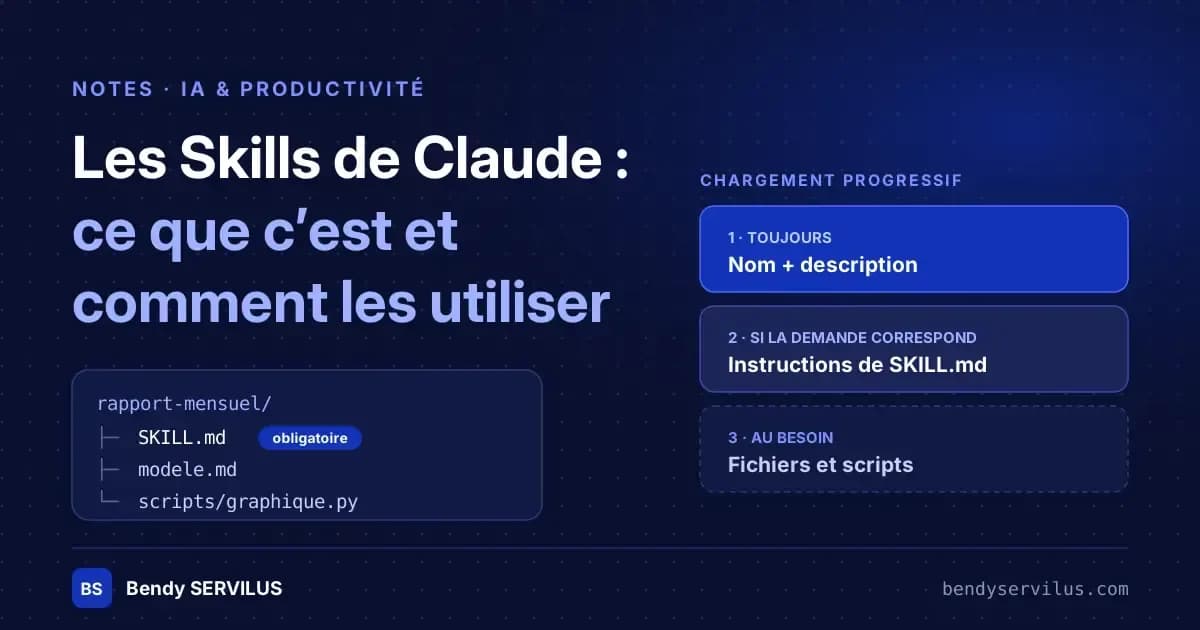
Every time you ask an AI to follow your specific workflow, you have to re-explain everything: the report format, your organization's color scheme, the steps to follow. Claude Skills solve this problem. You write the method once, and Claude reuses it whenever it's useful.
What is a Skill?
A Skill is a folder containing instructions, and sometimes scripts or templates. Claude loads it automatically when your request matches what it knows how to do.
A prompt is used for a single conversation. A Skill, however, remains available: it acts as a procedure sheet that Claude consults at the right moment.
How Claude chooses the right Skill
Claude doesn't read every Skill with every message. It works in three levels, what Anthropic calls progressive disclosure:
Initially, Claude only knows the name and description of each Skill, which is about 100 tokens per Skill.
When a request matches, it reads the full instructions of the Skill.
Only when needed, it opens auxiliary files or runs scripts. Only the result of a script enters the conversation, not its code.
You can therefore install many Skills without weighing down your interactions.
Skills provided by Anthropic
Four Skills are ready to use for creating and editing documents:
Word (
docx): drafting and formatting documents.Excel (
xlsx): spreadsheets, formulas, analyses, and charts.PowerPoint (
pptx): creating and editing presentations.PDF (
pdf): report generation, text extraction, and forms.
Simply ask, for example: "Make me an Excel spreadsheet of my monthly budget." Claude activates the right Skill on its own.
Partner Skills
Publishers like Notion, Figma, or Atlassian also offer their own Skills. They are designed to work with the connectors of these tools.
Creating your own Skill
This is where Skills become truly useful. A simple Skill requires no programming: a single SKILL.md file is enough.
markdown
---
name: monthly-report
description: Writes the monthly activity report following the team's template. Use when asked for a monthly report, review, or summary.
---

# Monthly report

## Structure
1. Three-sentence summary
2. Key metrics for the month, as a table
3. Challenges encountered
4. Priorities for next month

## Style
Short sentences, rounded figures, no jargon.
Two rules matter:
The
name: maximum 64 characters, in lowercase, with numbers and hyphens.The
description: this determines when Claude uses the Skill. It must state what the Skill does and when to use it.
To go further, add reference files or Python scripts in the same folder. Anthropic also offers a dedicated Skill, skill-creator, which helps write and test your own.
Where to use them
Claude.ai: under "Customize", then "Skills". Code execution must be enabled. On Team and Enterprise plans, administrators can deploy Skills for the entire organization.
Claude Code: place the folder in
~/.claude/skills/for yourself, or in.claude/skills/for a project shared with the team.
API: send your Skills via the
/v1/skillsendpoint. They are then shared across the entire workspace.
Please note: Skills do not synchronize between these three environments. A Skill imported into Claude.ai must be added separately in Claude Code or the API.
A word on security
A Skill can execute code. Only install trusted Skills, either your own or Anthropic's, and review their files before adding them, just as you would for any software.
A good Skill is a procedure you explain once and for all. If you often repeat the same instructions to Claude, it's a sign that it's time to write one.
Share this note
Comments
No comments yet. Be the first to share your thoughts.